OSTRATA · Developer documentation
API & MCP reference
Integrate with OSTRATA using the REST API (osk_ keys) or connect AI clients via MCP (omk_ keys). REST base URL: https://ostrata.io/api/v1
Remote MCP server URL: https://ostrata.io/api/mcp
Workspace admins create keys in Setup → API. You do not need a user account to read this documentation.
Introduction
The OSTRATA REST API lets external systems read and write workspace data: custom objects, fields, and records. It mirrors the same permission model as workspace members — each integration key is bound to a permission profile that controls what the key can do.
The API is versioned under /api/v1. Breaking changes will ship under a new version prefix; non-breaking additions stay on v1.
Authentication
Every request must include a workspace integration API key in the Authorization header. Keys are created by a workspace admin in Setup → API and are shown only once at creation.
Revoked keys are rejected immediately. Keys do not expire automatically — rotate by creating a new key and revoking the old one.
- Keys start with the prefix osk_.
- Never commit keys to source control or expose them in client-side apps.
- Assign the narrowest permission profile that satisfies the integration.
Authorization: Bearer osk_YOUR_SECRET_KEY
Getting started
You need an API key from a workspace administrator. If you are building an integration for a customer workspace, ask their admin to create a dedicated permission profile (Setup → Permissions) and an integration key (Setup → API) with that profile.
Replace the base URL below with your OSTRATA deployment origin (same host you use in the browser).
curl -s -H "Authorization: Bearer osk_YOUR_KEY" \
  "https://ostrata.io/api/v1/objects/contacts/records?limit=5"
curl -s -X POST \
  -H "Authorization: Bearer osk_YOUR_KEY" \
  -H "Content-Type: application/json" \
  -d '{"name":"Jane Doe","fields":{"email":"jane@example.com"}}' \
  "https://ostrata.io/api/v1/objects/contacts/records"
Requests and responses
Request and response bodies are JSON. Use Content-Type: application/json on POST and PATCH requests with a body.
Successful responses use a data envelope. Errors use an error object with code and message.
- unauthorized (401) — missing or invalid API key
- forbidden (403) — key valid but action not allowed by profile
- not_found (404) — object, field, or record not found
- bad_request (400) — validation failed
- conflict (409) — duplicate name or API name
{
  "data": { "record": { "id": "…", "name": "Jane Doe", "fields": {} } }
}{
"error": {
"code": "forbidden",
"message": "This API key does not have permission for this action."
}
}Permissions
Authorization is enforced from the permission profile attached to the API key — not from the admin who created the key. Create narrow profiles for integrations (e.g. “Zapier — contacts sync”) with only the object, field, and record rights required.
Record responses omit field values the profile cannot read. Create and update requests ignore fields the profile cannot edit.
- object.create / object.update / object.delete — schema-level object changes
- field.create / field.update / field.delete — field definitions on objects
- Per-object record view / create / update / delete — configured in the profile matrix
- Per-field read / edit — optional overrides per object
Objects and fields
Objects are addressed by apiName (e.g. contacts, deals, projects). Fields use apiName within their parent object.
Standard CRM objects ship with every workspace. Custom objects are created via the API or Setup UI.
Records
Records expose a name plus a fields object (maps to stored custom data). Lookup and address fields use the same key conventions as the OSTRATA UI.
Each record also has a notes timeline (child of the record, not a schema field). List/create/delete notes under /records/:recordId/notes. View follows parent record view; create and delete follow parent record update.
List records supports limit (1–100), offset (0–10,000), and q for text search. Responses include count, offset, limit, and hasMore for pagination.
For large migrations, use bulk import jobs under /import/jobs instead of creating records one at a time.
Bulk import
Bulk import mirrors Setup → Data import: create a job, map columns, validate every row, then run. Requires a workspace admin permission profile on the API key.
Same limits apply: 10 MB files, 10,000 data rows, one primary object per job, optional one embedded related object. Validation is all-or-nothing — no partial writes.
Workflow: POST /import/jobs → PATCH mappings (optional) → POST …/validate → POST …/run. Jobs run in the background; poll GET …/jobs/:jobId for status.
- JSON body — supply headers and rows directly (max 10,000 rows)
- Multipart — upload CSV or Excel (.csv, .xlsx, .xls) with primaryObjectApiName form field
- Standard and custom objects — primaryObjectApiName matches object API names
- embedded — create/update related records from the same rows and link via a lookup field
- duplicateMode — create, skip, or update (Contacts match email/phone; name-based objects match normalized name)
- Auto-number fields are system-generated; computed quote totals cannot be imported
- Events sync to Google Calendar when the API key actor has calendar connected
curl -s -X POST \
  -H "Authorization: Bearer osk_YOUR_KEY" \
  -H "Content-Type: application/json" \
  -d '{"fileName":"contacts.csv","headers":["email"],"rows":[{"email":"ada@example.com","first_name":"Ada","last_name":"Lovelace"}],"primaryObjectApiName":"contacts","duplicateMode":"update"}' \
  "https://ostrata.io/api/v1/import/jobs"

curl -s -X POST \
  -H "Authorization: Bearer osk_YOUR_KEY" \
"https://ostrata.io/api/v1/import/jobs/JOB_ID/validate"curl -s -X POST \ -H "Authorization: Bearer osk_YOUR_KEY" \ "https://ostrata.io/api/v1/import/jobs/JOB_ID/run"
Inbound webhooks
Workspace admins create inbound endpoints in Setup → Webhooks. External systems POST JSON to receive CRM record creates or updates.
Authenticate with Authorization: Bearer whk_… (token shown once when the endpoint is created).
Field mapping in Setup defines how JSON paths map to CRM fields. Action can be create, update, or upsert (match on a field such as email).
- 201 — record created; 200 — record updated
- Response body: { record_id, action: "created" | "updated" }
- Permission profile on the endpoint caps field-level write access
- Outbound record events are configured separately in Setup → Webhooks (not on /api/v1)
curl -s -X POST \
  -H "Authorization: Bearer whk_YOUR_TOKEN" \
  -H "Content-Type: application/json" \
  -d '{"name":"Ada Lovelace","email":"ada@example.com"}' \
  "https://ostrata.io/api/webhooks/inbound/WEBHOOK_ID"
Overview
OSTRATA exposes a remote MCP server so Claude, Cursor, and other MCP clients can search and update CRM data on your behalf.
Each member creates their own connection from Personal space → MCP. Keys use the omk_ prefix and inherit the member's permission profile — the same boundaries as Operations.
Authentication
Send Authorization: Bearer omk_YOUR_KEY on every MCP request when using Claude Code or Cursor.
Claude Desktop and Claude web use OAuth instead: paste OAuth Client ID and Secret in Advanced settings, then sign in when Claude prompts you. Claude sends OAuth access tokens as Bearer on MCP calls.
Member MCP keys (omk_) work only on /api/mcp. Admin REST integration keys (osk_) work only on /api/v1 — they are separate products.
Claude (custom connector)
In Claude Desktop or Claude web: Settings → Connectors → Add custom connector. Paste the connector name, server URL, OAuth Client ID, and OAuth Client Secret from Personal space → MCP.
When you connect, Claude opens a browser so you can sign in to OSTRATA. That login ties the session to your workspace member — the same user who created the connection.
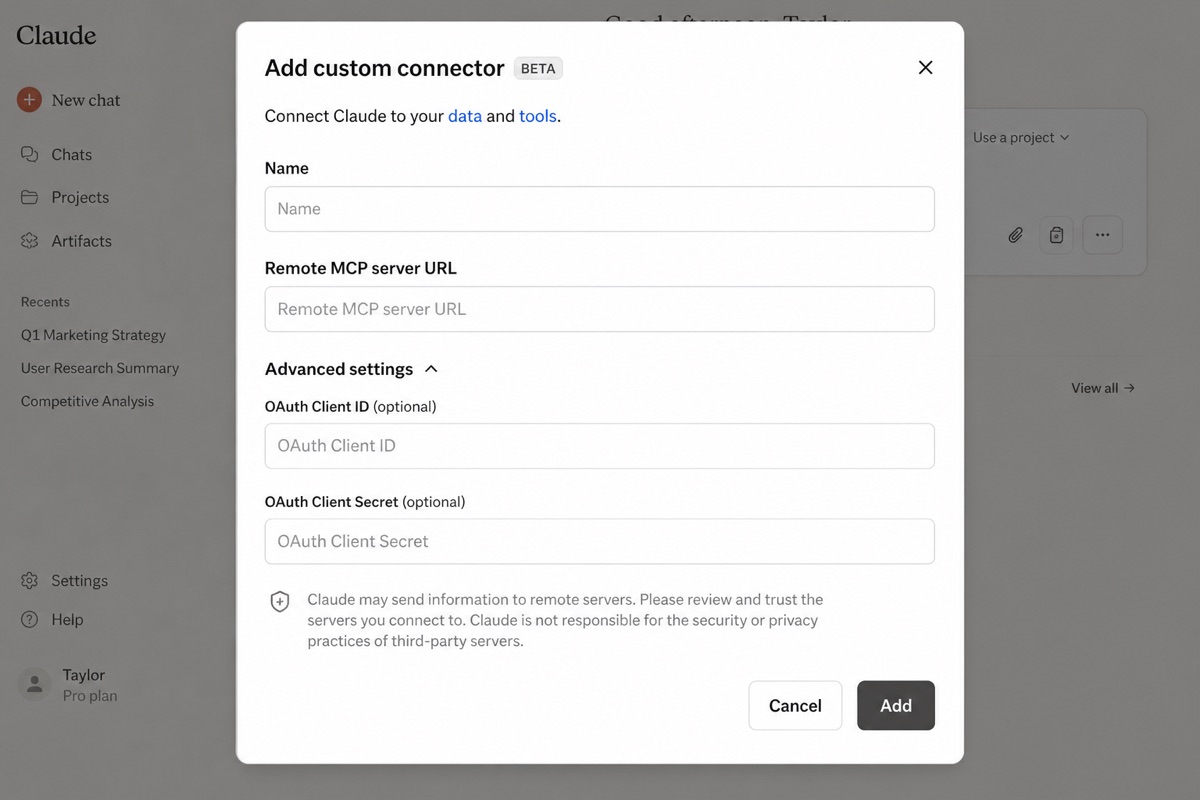
Name: OSTRATA
Remote MCP server URL: https://ostrata.io/api/mcp
OAuth Client ID: omc_…
OAuth Client Secret: ocs_…
Claude Code
Native HTTP transport — no proxy required.
claude mcp add --transport http ostrata https://ostrata.io/api/mcp \
  --header "Authorization: Bearer omk_YOUR_KEY"
Cursor
Add under Cursor Settings → MCP.
{
  "mcpServers": {
    "ostrata": {
      "url": "https://ostrata.io/api/mcp",
      "headers": {
        "Authorization": "Bearer omk_YOUR_KEY"
      }
    }
  }
}
Tools
Call list_objects first to discover object apiNames and fields. search_records supports query (text search), structured filters like Pilot, and pagination via offset + limit (up to 50 per page). For exact totals use count_records — search is display-capped.
add_field: for lookups pass lookup.targetObjectApiName (flat lookupTargetObjectApiName also works). For picklists pass options with label and apiName (name is a label alias). A select with no options is rejected instead of creating an empty picklist.
- list_objects — List visible CRM object types and readable fields.
- describe_object — Get one object schema by apiName.
- search_records — Search records with query, filters, and offset/limit pagination (display-capped).
- count_records — Exact SQL COUNT(*) for one object — use for how-many / totals instead of search_records.
- get_record — Read one record.
- create_record — Create a record (created_by = connection owner).
- update_record — Update record fields.
- delete_record — Delete a record.
- list_related_records — List child records linked via lookups.
- create_object — Create a custom object.
- update_object — Update object metadata.
- delete_object — Delete a custom object.
- add_field — Add a field to an object. Lookup: lookup.targetObjectApiName. Select: options [{ label, apiName }].
- update_field — Update a field definition, including picklist options.
- remove_field — Remove a field.
- list_import_jobs — List bulk import jobs (admin profile).
- create_import_job — Create import job draft.
- get_import_job — Get import job detail.
- validate_import_job — Validate import mappings.
- run_import_job — Execute import job.
- list_attachments — List files on a record.
- upload_attachment — Upload base64 file to a record.
- delete_attachment — Delete an attachment.
- list_notes — List notes on a record (newest first).
- query_notes — Search note text, or list all notes on a record when query is omitted and recordId is set.
- create_note — Add a note to a record (source=system for notetakers).
- delete_note — Delete a note by id.
- draft_email_to_contact — AI draft email to a CRM contact.
- send_email — Send email from connection owner's Gmail.
Endpoints
All paths below are relative to /api/v1. Path segments in italics (e.g. :objectApiName) are replaced with real values.
/api/v1/objectsReturns all object types the API key may view, including standard CRM objects (Contacts, Deals, etc.) and custom objects. Each object includes readable field metadata.
{
  "data": {
    "objects": [
      {
        "apiName": "contacts",
        "name": "Contacts",
        "isDefault": true,
        "fields": [
          {
            "apiName": "email",
            "name": "Email",
            "type": "email",
            "required": false
          }
        ]
      }
    ]
  }
}curl -H "Authorization: Bearer osk_YOUR_KEY" \ "https://ostrata.io/api/v1/objects"
/api/v1/objectsCreates a new custom object type in the workspace. Requires object.create on the key's permission profile.
{
  "name": "Projects",
  "apiName": "projects",
  "attachmentsEnabled": true
}{
"data": {
"object": {
"apiName": "projects",
"name": "Projects",
"isDefault": false,
"fields": []
}
}
}curl -X POST -H "Authorization: Bearer osk_YOUR_KEY" \
-H "Content-Type: application/json" \
-d '{"name":"Projects","apiName":"projects"}' \
"https://ostrata.io/api/v1/objects"/api/v1/objects/:objectApiNameFetches a single object by its API name, including field definitions the key may read.
Path parameters
| Name | Description |
|---|---|
objectApiName | Stable API name (e.g. contacts, deals). |
/api/v1/objects/:objectApiNameUpdates the display name and/or API name of an object.
Path parameters
| Name | Description |
|---|---|
objectApiName | Current API name of the object. |
{
  "name": "Customers",
  "apiName": "customers"
}/api/v1/objects/:objectApiNameDeletes a custom object and its schema. Default CRM objects cannot be deleted.
Path parameters
| Name | Description |
|---|---|
objectApiName | API name of the custom object. |
{
  "data": {
    "deleted": true
  }
}/api/v1/objects/:objectApiName/fieldsLists field definitions on an object that the API key may read.
Path parameters
| Name | Description |
|---|---|
objectApiName | Parent object API name. |
/api/v1/objects/:objectApiName/fieldsAdds a new field to an object schema. Lookups accept lookup.targetObjectApiName or lookupTargetObjectApiName. Picklists accept selectOptions or options, with label or name.
Path parameters
| Name | Description |
|---|---|
objectApiName | Parent object API name. |
{
  "name": "Industry",
  "apiName": "industry",
  "type": "select",
  "required": false,
  "selectOptions": [
    {
      "label": "SaaS",
      "apiName": "saas"
    }
  ]
}/api/v1/objects/:objectApiName/fields/:fieldApiNameReturns one field definition.
Path parameters
| Name | Description |
|---|---|
objectApiName | Parent object API name. |
fieldApiName | Field API name. |
/api/v1/objects/:objectApiName/fields/:fieldApiNameUpdates field label, API name, type, select options, or currency code.
Path parameters
| Name | Description |
|---|---|
objectApiName | Parent object API name. |
fieldApiName | Field API name. |
{
  "name": "Industry segment"
}/api/v1/objects/:objectApiName/fields/:fieldApiNameRemoves a user-defined field from an object.
Path parameters
| Name | Description |
|---|---|
objectApiName | Parent object API name. |
fieldApiName | Field API name. |
/api/v1/objects/:objectApiName/recordsLists records for an object. Field values in responses are filtered to what the key may read.
Path parameters
| Name | Description |
|---|---|
objectApiName | Object API name (e.g. contacts). |
Query parameters
| Name | Description |
|---|---|
limit | Max records to return (1–100, default 25). |
offset | Number of matching records to skip for pagination (0–10,000, default 0). |
q | Optional text search across record name and fields. |
{
  "data": {
    "records": [
      {
        "id": "uuid",
        "name": "Jane Doe",
        "fields": {
          "email": "jane@example.com"
        }
      }
    ],
    "count": 1,
    "offset": 0,
    "limit": 25,
    "hasMore": false
  }
}curl -H "Authorization: Bearer osk_YOUR_KEY" \ "https://ostrata.io/api/v1/objects/contacts/records?limit=20&offset=0"
/api/v1/objects/:objectApiName/recordsCreates a record. Writable fields are limited by the permission profile.
Path parameters
| Name | Description |
|---|---|
objectApiName | Object API name. |
{
  "name": "Jane Doe",
  "fields": {
    "email": "jane@example.com",
    "status": "active"
  }
}curl -X POST -H "Authorization: Bearer osk_YOUR_KEY" \
-H "Content-Type: application/json" \
-d '{"name":"Jane Doe","fields":{"email":"jane@example.com"}}' \
"https://ostrata.io/api/v1/objects/contacts/records"/api/v1/objects/:objectApiName/records/:recordIdReturns a single record by UUID.
Path parameters
| Name | Description |
|---|---|
objectApiName | Object API name. |
recordId | Record UUID. |
/api/v1/objects/:objectApiName/records/:recordIdUpdates record name and/or field values.
Path parameters
| Name | Description |
|---|---|
objectApiName | Object API name. |
recordId | Record UUID. |
{
  "fields": {
    "status": "customer"
  }
}/api/v1/objects/:objectApiName/records/:recordIdPermanently deletes a record.
Path parameters
| Name | Description |
|---|---|
objectApiName | Object API name. |
recordId | Record UUID. |
/api/v1/objects/:objectApiName/records/:recordId/notesLists notes on a record, newest first. Notes are a child of the record (not a schema field). View follows parent record view.
Path parameters
| Name | Description |
|---|---|
objectApiName | Object API name. |
recordId | Record UUID. |
{
  "data": {
    "notes": [
      {
        "id": "…",
        "body": "Follow-up after the demo.",
        "preview": "Follow-up after the demo.",
        "source": "user",
        "createdBy": "…",
        "createdByName": "Elena Stan",
        "createdAt": "2026-08-18T12:00:00.000Z",
        "isSystem": false
      }
    ]
  }
}curl -H "Authorization: Bearer osk_YOUR_KEY" \ "https://ostrata.io/api/v1/objects/contacts/records/RECORD_ID/notes"
/api/v1/objects/:objectApiName/records/:recordId/notesCreates a note on a record. Requires record update. Pass source=system for notetaker/integration notes (displayed as System).
Path parameters
| Name | Description |
|---|---|
objectApiName | Object API name. |
recordId | Record UUID. |
{
  "body": "Follow-up after the demo.",
  "source": "api"
}{
"data": {
"note": {
"id": "…",
"body": "Follow-up after the demo.",
"preview": "Follow-up after the demo.",
"source": "api",
"createdBy": "…",
"createdByName": "Integration bot",
"createdAt": "2026-08-18T12:00:00.000Z",
"isSystem": false
}
}
}curl -X POST -H "Authorization: Bearer osk_YOUR_KEY" \
-H "Content-Type: application/json" \
-d '{"body":"Follow-up after the demo.","source":"api"}' \
"https://ostrata.io/api/v1/objects/contacts/records/RECORD_ID/notes"/api/v1/objects/:objectApiName/records/:recordId/notes/:noteIdDeletes a note. Requires record update on the parent object.
Path parameters
| Name | Description |
|---|---|
objectApiName | Object API name. |
recordId | Record UUID. |
noteId | Note UUID. |
{
  "data": {
    "deleted": true,
    "noteId": "…"
  }
}/api/v1/import/jobsLists bulk import jobs for the workspace. Requires a workspace admin permission profile on the API key.
Query parameters
| Name | Description |
|---|---|
limit | Max jobs to return (1–100, default 25). |
{
  "data": {
    "jobs": [
      {
        "id": "…",
        "fileName": "contacts.csv",
        "status": "succeeded",
        "rowCount": 120,
        "primaryObject": {
          "apiName": "contacts",
          "name": "Contacts"
        }
      }
    ]
  }
}curl -H "Authorization: Bearer osk_YOUR_KEY" \ "https://ostrata.io/api/v1/import/jobs?limit=25"
/api/v1/import/jobsCreates a bulk import job. Send JSON with headers and rows, or multipart/form-data with a file field plus primaryObjectApiName. Discards other draft sessions for the key actor. Same validation and duplicate rules as Setup → Data import.
{
  "fileName": "contacts.csv",
  "headers": [
    "first_name",
    "last_name",
    "email"
  ],
  "rows": [
    {
      "first_name": "Ada",
      "last_name": "Lovelace",
      "email": "ada@example.com"
    }
  ],
  "primaryObjectApiName": "contacts",
  "sourceType": "external_crm",
  "duplicateMode": "update",
  "primaryMappings": [
    {
      "fileColumn": "first_name",
      "fieldApiName": "first_name"
    },
    {
      "fileColumn": "email",
      "fieldApiName": "email"
    }
  ],
  "embedded": {
    "enabled": true,
    "objectApiName": "companies",
    "linkFieldApiName": "company",
    "matchKeyColumn": "company_name",
    "mappings": [
      {
        "fileColumn": "company_name",
        "fieldApiName": "name"
      }
    ]
  }
}{
"data": {
"job": {
"id": "…",
"status": "draft",
"primaryObject": {
"apiName": "contacts",
"name": "Contacts"
}
}
}
}curl -X POST -H "Authorization: Bearer osk_YOUR_KEY" \
-H "Content-Type: application/json" \
-d '{"fileName":"contacts.csv","headers":["first_name","email"],"rows":[{"first_name":"Ada","email":"ada@example.com"}],"primaryObjectApiName":"contacts"}' \
"https://ostrata.io/api/v1/import/jobs"/api/v1/import/jobs/:jobIdReturns one import job with config, validation result, and result summary when finished.
Path parameters
| Name | Description |
|---|---|
jobId | Import job UUID. |
/api/v1/import/jobs/:jobIdUpdates source type, primary object, duplicate mode, column mappings, or embedded object config.
Path parameters
| Name | Description |
|---|---|
jobId | Import job UUID. |
{
  "duplicateMode": "update",
  "primaryMappings": [
    {
      "fileColumn": "email",
      "fieldApiName": "email"
    }
  ]
}/api/v1/import/jobs/:jobIdRemoves an import job from history. Cannot delete running jobs.
Path parameters
| Name | Description |
|---|---|
jobId | Import job UUID. |
{
  "data": {
    "deleted": true
  }
}/api/v1/import/jobs/:jobId/validateRuns an all-or-nothing dry-run on every row. On success the job status becomes validated and can be run.
Path parameters
| Name | Description |
|---|---|
jobId | Import job UUID. |
/api/v1/import/jobs/:jobId/runExecutes a validated import job in the background. Returns 202 Accepted when the platform supports deferred work; otherwise waits and returns the finished job.
Path parameters
| Name | Description |
|---|---|
jobId | Import job UUID. |
{
  "data": {
    "jobId": "…",
    "status": "running"
  }
}curl -X POST -H "Authorization: Bearer osk_YOUR_KEY" \ "https://ostrata.io/api/v1/import/jobs/JOB_UUID/run"