
Choosing a CRM for an SMB is not about selecting the tool with the most features. The priority is to assess how well it fits the team size, sales processes, data model, and required level of customization.
This comparison reviews six solutions against five criteria: simplicity, flexibility, automation, integrations, and total cost.
Key CRM criteria for SMBs
1. Ease of adoption
A CRM should be adopted quickly by sales, marketing, and support teams. An overly complex interface slows usage and encourages people to return to Excel files or parallel tools.
2. Data model
Not every SMB manages only contacts and opportunities. Some also need to track projects, partners, equipment, contracts, or applications.
The central question is simple: Can the CRM represent the objects and relationships specific to the business?
3. Automation
A CRM should reduce repetitive work:
Create records.
Update statuses.
Search for information.
Link records.
Track activities.
4. Integrations
Connections with email, calendars, files, communication tools, and internal applications can reduce duplicate data entry.
Check the actual scope of each integration: accessible data, synchronization direction, plan restrictions, and administration requirements.
5. Total cost
The subscription price is only part of the cost. Also consider:
Configuration.
Data migration.
Training.
Integrations.
Ongoing administration.
Any additional modules.
1. Salesforce: a platform for complex requirements

Salesforce is one of the most comprehensive CRMs on the market. It is designed for companies that need extensive customization, advanced automation, and a broad ecosystem.
Strengths
Highly customizable data model and processes.
Extensive automation and reporting capabilities.
Large catalog of integrations and extensions.
Suitable for organizations that want to standardize multiple teams or activities.
Limitations to consider
Implementation often requires more time, expertise, and governance than a simpler CRM.
An SMB should assess the cost of configuration and administration, not only the license cost.
Salesforce is a good fit when the CRM is a central, strategic system and processes are complex enough to justify the investment.
2. HubSpot CRM: an accessible, scalable suite
HubSpot CRM is often chosen by SMBs that want to bring sales, marketing, and customer service management together in one environment.
Strengths
Generally accessible interface for non-technical teams.
Management of contacts, companies, activities, and opportunities.
Ecosystem covering marketing, sales, and service.
Ability to start with a limited scope and add capabilities over time.
Limitations to consider
Cost and complexity can increase when a company activates advanced features or multiple modules.
Check exactly which features are included at each subscription level, as well as the limits applied to users and automations.
HubSpot is a relevant choice for an SMB looking for a structured suite with a strong marketing and sales focus.
3. Pipedrive: a simple CRM for managing sales
Pipedrive focuses on the sales pipeline. Its visual layout makes it easy to track opportunities, sales stages, and next actions.
Strengths
Fast to adopt.
Easy-to-understand pipeline.
Clear visibility into opportunities.
Well suited to small sales teams.
Limitations to consider
Pipedrive is less suitable when a company needs to manage highly specific business objects or complex relationships between multiple record types.
Pipedrive is a good choice for an SMB whose main requirement is to structure and track a traditional sales cycle.
4. OSTRATA: an AI-piloted headless CRM
OSTRATA takes a different approach from traditional CRMs.
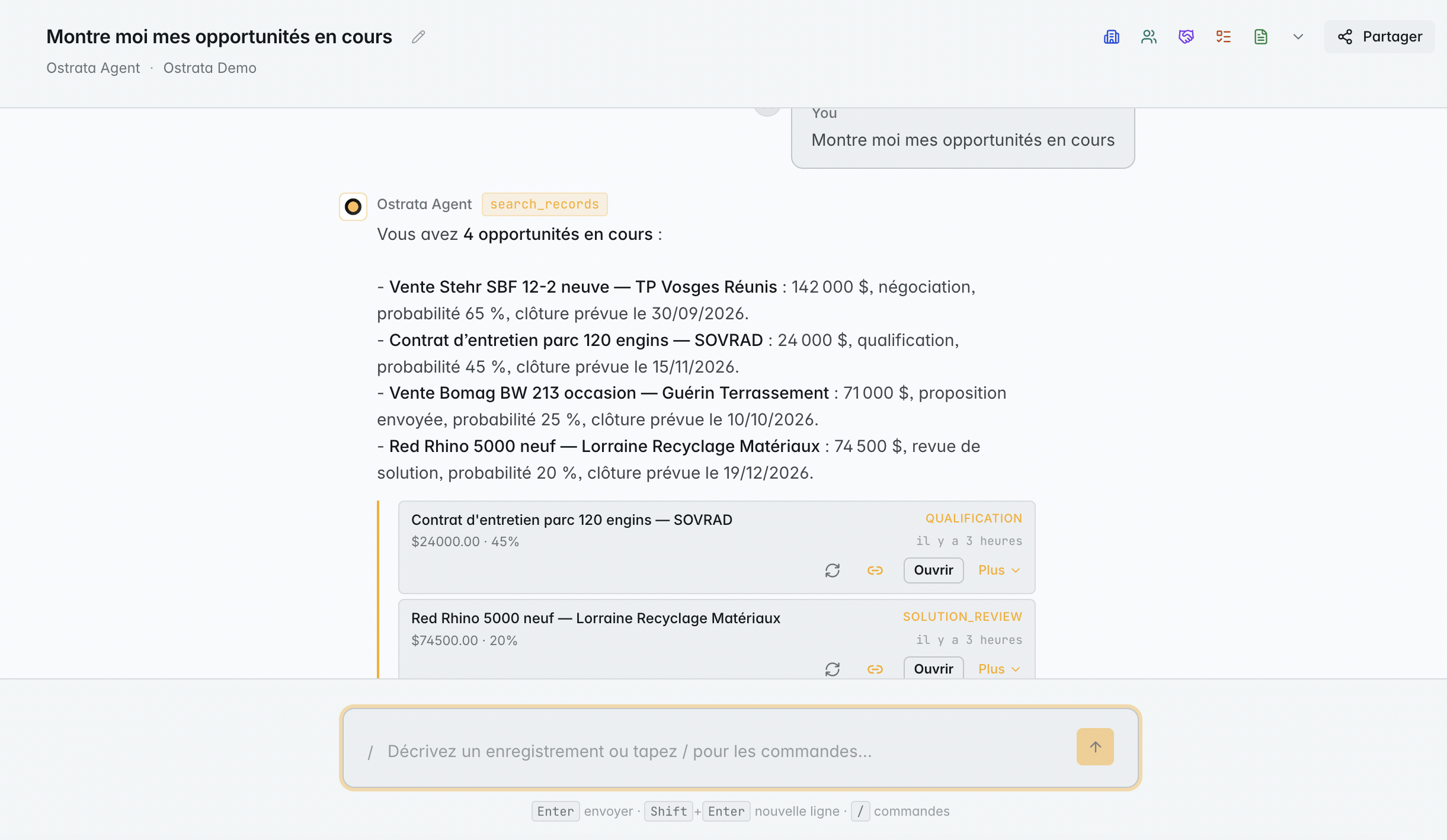
Users define their own data schemas: Contacts, Deals, and custom objects. They then interact with this data in Operations, a natural-language chat interface.
The AI executes actions through tool calls to create, search, link, or update records.
What sets OSTRATA apart
Customizable schemas: the business defines its objects, fields, and relationships.
Natural-language Operations: users make requests without relying on a forms-heavy interface.
Live Views: the AI generates tables, dashboards, and kanban views from the available data.
Centralized Setup: objects, fields, permissions, integrations, and API keys are configured in one place.
Google Drive for the workspace.
Google Calendar and Gmail through personal connections.
Telegram with a workspace bot and member linking.
REST API with scoped keys.
Multi-tenant isolation with row-level security rules.
OSTRATA suits SMBs that want to adapt the CRM to their business rather than reorganize their processes around a standard model.
Limitations to consider
This approach requires clear definitions for objects, fields, and permissions.
CRM flexibility needs to be governed by a coherent data model. Access rules should also be defined before rolling out usage across multiple teams.
5. Zoho CRM: a general-purpose CRM with a broad ecosystem
Zoho CRM is part of a suite of applications covering sales, support, finance, marketing, and collaboration.
Strengths
Broad feature set for a general-purpose CRM.
Integration with other Zoho applications.
Customization and automation options.
Often competitive positioning for SMBs.
Limitations to consider
The breadth of features can make configuration less immediate.
The experience also depends on the selected modules and the level of configuration required.
Zoho CRM is a good fit for SMBs that want to build a broad application environment around a single vendor.
6. monday CRM: a visual CRM built around workflows
monday CRM is based on visual boards, columns, and workflows.
This approach can suit teams that want to bring sales management, collaboration, and operational tracking closer together.
Strengths
Visual, customizable views.
Workflow configuration without extensive development.
Usable by multiple teams beyond sales.
Clear visibility into tasks and stages.
Limitations to consider
A high degree of configuration freedom can create different structures from one team to another.
Governance of fields, statuses, and processes becomes more important as usage expands.
monday CRM is relevant for an SMB looking for a visual workspace that is more flexible than a traditional sales pipeline.
Comparison by need
Move quickly
Pipedrive and HubSpot are generally the most direct options for getting started with standard contact and opportunity management.
Customize the data model
OSTRATA and Salesforce are suitable when a company needs to represent specific objects, fields, and relationships.
The difference lies in the approach:
Salesforce is built on a highly configurable CRM platform.
OSTRATA lets the business define its model and operate on the data through a conversational interface in Operations.
Bring marketing and sales together
Consider HubSpot if the SMB wants to connect acquisition, marketing, sales, and service within one ecosystem.
Support a pipeline-focused sales team
Pipedrive fits teams primarily looking to track opportunities, activities, and sales stages.
Build an application ecosystem
Zoho is worth considering for SMBs planning to use several applications from the same vendor.
Manage cross-functional visual workflows
monday CRM can work well when the CRM also needs to support collaboration and internal process tracking.
Traditional CRM or AI-piloted CRM?
A traditional CRM organizes usage around menus, records, forms, and predefined views. This approach works well when the process is stable and standardized.
An AI-piloted CRM lets users state an intention directly:
“Create a deal for this company.”
“Show me opportunities with no activity in the last 14 days.”
“Link this contact to the corresponding account.”
“Update the status of these deals.”
In OSTRATA, these requests are handled in Operations and executed by the AI through tool calls.
The data remains structured in the objects and fields defined by the business. AI does not eliminate the need for structure. It changes part of the interaction: users act on a data model defined in Setup instead of relying on forms for every operation.
Permissions and model governance remain essential.
How to choose an SMB CRM
Step 1: Define the objects to manage
Start by listing the elements the business actually tracks:
Contacts.
Companies.
Opportunities.
Projects.
Contracts.
Partners.
Objects specific to your business.
If the list goes beyond the standard model of a sales CRM, check customization options before comparing interfaces.
Step 2: Describe daily operations
Identify recurring actions:
Search for information.
Create a record.
Link two objects.
Change a status.
Prepare a tracking view.
Update multiple records.
The best CRM is the one that makes these actions fast and reliable for users.
Step 3: Check required integrations
List the tools the team already uses:
Email.
Calendar.
File storage.
Instant messaging.
Internal applications.
Check the available integrations, their scope, and any restrictions related to the selected plan.
For OSTRATA, available integrations include Google Drive for the workspace, Google Calendar and Gmail through personal connections, Telegram with a workspace bot and member linking, and a REST API with scoped keys.
Step 4: Test with real data
Testing a concrete scenario quickly reveals issues with data quality, permissions, and workflows.
Ask users to perform several common operations without ongoing administrator assistance:
Search for a record.
Create an object.
Link two records.
Update a status.
Display the data in a suitable view.
Step 5: Calculate the full cost
Compare:
Per-user licenses.
Additional modules.
Initial configuration.
Data migration.
Training.
Custom integrations.
Ongoing administration.
Which CRM should you choose based on team size?
A team of 1 to 10 people
Prioritize simplicity and fast adoption.
Pipedrive, HubSpot, or monday CRM may suit a standard requirement.
OSTRATA may be relevant if the team wants to structure specific business data and interact with it in natural language, without relying on a form-based interface for every operation.
A team of 10 to 50 people
Managing permissions, processes, and data quality becomes more important.
Compare HubSpot, Zoho, OSTRATA, and Salesforce based on the expected level of customization and administration.
An SMB with several business activities
If multiple teams share data but follow different processes, evaluate carefully:
The object model.
Relationships between data.
Permissions.
Available views.
Model governance.
Integrations with existing tools.
A highly standardized platform may limit special cases. A highly flexible platform may require more upfront definition and governance.
Conclusion: the best CRM is the one the team actually uses
There is no single best CRM for every SMB.
Salesforce targets complex, highly customized requirements.
HubSpot offers a structured suite built around marketing, sales, and service.
Pipedrive prioritizes sales pipeline simplicity.
OSTRATA offers a headless CRM where the business defines its own data and interacts with it in natural language through Operations.
Zoho CRM fits within a broad application ecosystem.
monday CRM focuses on workflows and visual views.
The right choice depends on three factors: data structure, daily operations, and the required level of governance.
For an SMB that wants to reduce reliance on forms, adapt the data model to its business, and use AI to act directly on the CRM, OSTRATA is an option worth evaluating.